Free sales tracker template for small shops
Log your sales, list what you stock, and get a dashboard that shows your best days, top sellers and slow movers. Free, no sign-up, works in Google Sheets and Excel.
Download the free template (.xlsx)
Free to use and change for your own business. Please don't resell it or share it as your own. Provided as is; see our terms.
What's inside
- Start Here: three short steps and a key to which cells you type in.
- Sales Log: one row per sale: date, item, category, channel, quantity and price. Totals, weekdays and months fill in on their own.
- Items: what you sell and how many you have in stock. It works out units sold, revenue, the last time each item sold, and flags slow movers and low stock.
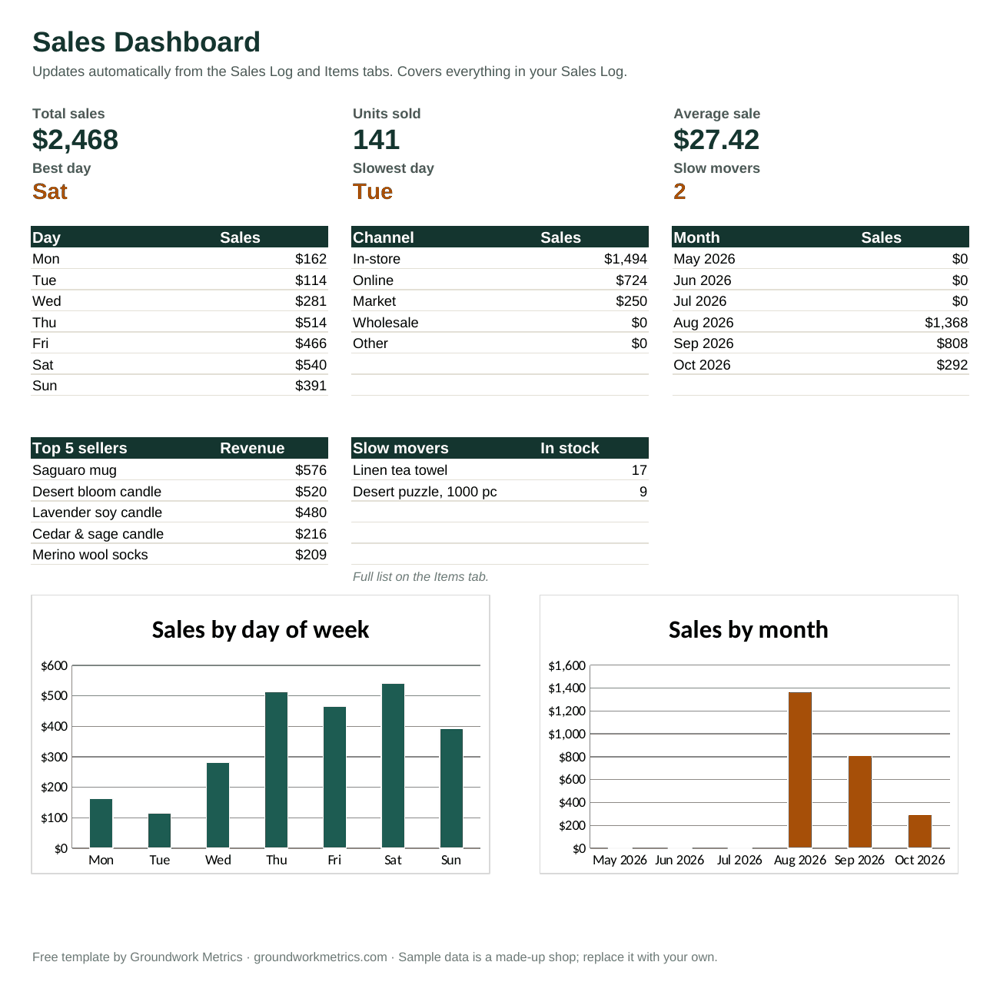
- Dashboard: total sales, units, average sale, best and slowest day, sales by day of week, channel and month, your top five sellers and your slow movers, with two charts.
How to use it in Google Sheets
- Download the file, then go to Google Drive and choose New, then File upload.
- Open the uploaded file and choose Open with, then Google Sheets. (If your Drive asks, you can also save it as a Google Sheets file.)
- Delete the sample rows in the yellow cells on the Sales Log and Items tabs, then add your own.
How to use it in Excel
Open the downloaded file in Excel 2019 or newer, or Microsoft 365. Replace the sample rows in the yellow cells with your own. Everything else updates on its own.
Why slow movers matter
Stock that hasn't sold in 90 days ties up cash you've already spent, takes shelf space from things that sell, and can quietly get reordered. The Items tab flags anything in stock that hasn't sold in 90 days, so you can bundle it, mark it down or stop reordering it.
How to get your sales data out
Menu names change, so if you can't find these, tell us what system you use and we'll point you to the right place.
- Square: in your Square Dashboard, open Reports, choose a sales report and use Export.
- Shopify: in the Shopify admin, open Orders and use Export, or export from a report under Analytics.
- Etsy: in Shop Manager, go to Settings, then Options, then Download Data, and choose orders.
- Clover, Toast and other registers: look for a Reports or Export option and choose CSV or Excel.
- A spreadsheet or notebook: type up a few weeks with the date, what sold and the amount. That's enough to start.
You don't need to send customer names, emails, phone numbers or card details. We'd rather you leave them out.
Questions
Is the sales tracker template really free?
Yes. It's a free download with no email or sign-up required. You can use it for your own business as long as you like.
Does it work in Google Sheets?
Yes. Upload the file to Google Drive, then open it with Google Sheets (or use File, then Import, inside a blank sheet). Everything, including the dashboard, keeps working.
Does it work in Excel?
Yes. It opens in Excel 2019 or newer and in Microsoft 365. It has no macros or add-ons.
What is a slow mover?
An item you have in stock that hasn't sold in 90 days or more, or hasn't sold at all since you started logging. The Items tab flags them for you, and the Dashboard lists them.
Can I paste in my Square, Shopify or Etsy export?
Yes. Paste the date, item, quantity and price columns into the Sales Log tab. Item names need to match the names on your Items tab so they're counted correctly.
Is my data private?
The file runs entirely in your own Google Drive or on your computer. It has no links, scripts or add-ons, and nothing you type into it is sent to us or anyone else.
Can I share or sell the template?
You're welcome to use and change it for your own business, and to send people the link to this page. Please don't resell it, or share or publish it as your own work.
Is this accounting software?
No. It's a simple tracking tool to help you see patterns in your sales and stock. It isn't accounting, tax or financial software or advice, and it's only as accurate as what you enter.
Can you set it up for me?
Yes. Send us your sales export and we'll build a one-page dashboard from it. Your first one is free.